2. AI models
The assistant is whichever model you connect. You can connect several and choose one per session.
Connecting a model
Go to Settings > AI models (or the first step on Home), choose a provider, fill in the form and press Save and test.
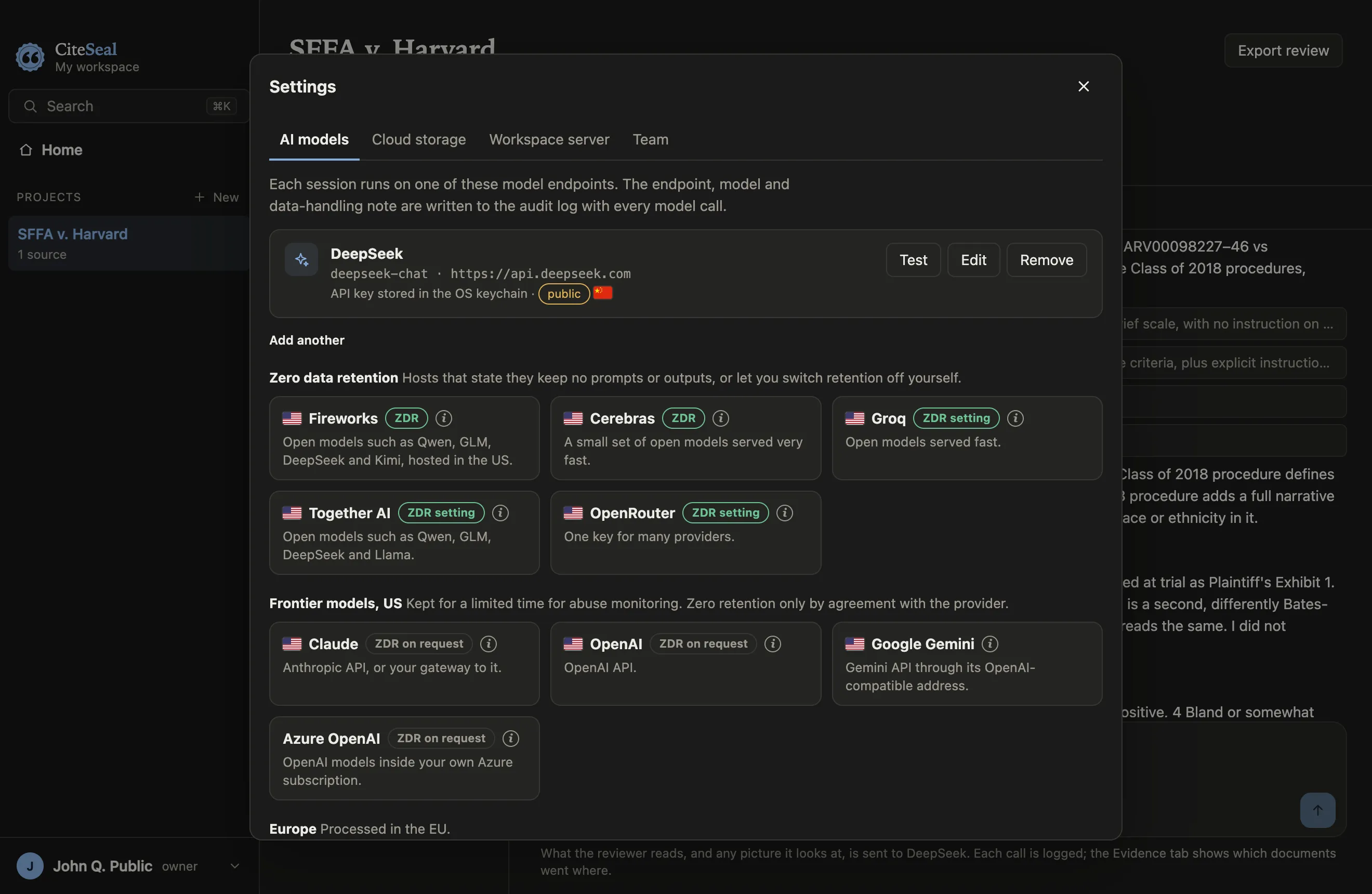
The picker lists providers in five groups, most protective of your documents first:
| Group | Providers | Notes |
|---|---|---|
| Zero data retention | Fireworks, Cerebras, Groq, Together AI, OpenRouter | US hosts of open models, including the Qwen, GLM, DeepSeek and Kimi families. Fireworks and Cerebras state they keep nothing by default. Groq and Together AI have a switch on your account with them; turn it on there, because the app cannot. OpenRouter is a relay with a Zero-retention hosts only switch, on by default. |
| Frontier models, US | Claude (Anthropic), OpenAI, Google Gemini, Azure OpenAI | Prompts are kept for a limited time for abuse monitoring. Zero retention only by agreement with the provider (Gemini offers none on its developer API). |
| Europe | Mistral | Processed in the EU. Zero retention on request. |
| Chinese model makers | Z.ai, Z.ai Coding Plan, Qwen, Qwen Token Plan, DeepSeek, Moonshot (Kimi) | Check where each processes data. Qwen lets you choose a region; your documents go to that region. The two subscription plans are sold for other uses; check their terms allow document review. For sensitive material, prefer the same model on a zero-retention host. |
| Your own hardware or network | Ollama, LM Studio, Other endpoint | Nothing is sent to a third party. “Other endpoint” is anything that speaks the OpenAI chat format: an internal gateway, vLLM and so on. |
Tags and flags
- ZDR (green): the provider states it keeps no prompts or outputs by default.
- ZDR setting (green): zero retention is a switch on your own account with the provider. Until you turn it on, the provider’s standard retention applies.
- ZDR on request (grey): only for customers the provider approves. Without that, prompts are kept for a time.
- A flag (United States, European Union, Singapore or China) shows where the provider says it processes requests. No flag means it depends on your account (Azure, a Qwen Token Plan) or is your own hardware. Qwen’s flag follows the region you choose. OpenRouter is a US company, but the host it passes a request to may be elsewhere.
The same tag and flag appear beside each model you have connected.
Privacy settings the app sends for you
Where a provider accepts a privacy setting on the request itself, the app always sends it:
- OpenAI: asks that the conversation is not stored in your account’s dashboard (
store: false). - OpenRouter: never routes to a host that stores or trains on data (
data_collection: deny), and with Zero-retention hosts only on, only to hosts that declare zero retention (zdr: true). Some models, mostly free ones, become unavailable as a result.
Other providers decide retention by account, not by request, so there is nothing for the app to send. Each model call in the audit log records the settings that were sent and the region.
Private or public
Every provider in the picker is marked:
- Private: the model runs on hardware you control, so document text is not sent to a third party. Ollama, LM Studio, and any endpoint on this computer or a private network address.
- Public: a hosted service run by someone else receives the text and pictures the assistant opens.
- Not classified: an address the app does not recognise that is not on a private network. Treat it as public unless you know who runs it.
The i beside each provider shows a short summary of what that provider says it does with your data. The form for a provider repeats it with links to the provider’s Terms of use and, where it has one, its Data handling page. The summaries are a starting point and carry the date they were last checked; the provider’s own pages are what count.
You may use a public provider. The app does not block it; it records it (see “Keeping track of what was sent”).
Show available models asks the endpoint which models your key can use, so you do not have to type a model name from memory.
What the model must be able to do
- Call tools. The assistant works by calling tools (list a folder, open a document, record a finding). A model without tool calling cannot review anything.
- Accept pictures, if you want it to look at photographs, scans, handwriting or video frames. A model without vision still reads text, including text read by OCR on your computer.
What is sent to the model
- The text of each document the assistant opens, and its file name and path.
- A picture, each time the assistant chooses to look at one: a photograph, a scanned page, a video frame or a sheet of video frames.
- Your questions and the project name and description.
API keys are stored encrypted on this computer and are never sent anywhere except to their own provider.
Zero retention and no training
If the material is sensitive, choose an endpoint that neither keeps your prompts nor trains on them. These are separate promises, and where the data is processed is a third; check each one.
- Run the model yourself (Ollama, LM Studio, your own server). Nothing leaves your network.
- Use a host from the Zero data retention group. Fireworks and Cerebras state it by default; for Groq and Together AI, switch it on in your account with them first. Or use a provider you have a zero-retention agreement with. Check that the exact model you want is covered.
- OpenRouter with “Zero-retention hosts only” on. Every request is refused unless a host that declares zero retention can serve the model, so some models are unavailable. The switch relies on what each host declares. When it is on, each model call in the audit log is marked as having asked for it.
The app cannot check any provider’s promise. Record what you have confirmed in the data-handling note.
Keeping track of what was sent
- When you start a session, the screen says whether the chosen model is private or public, and that what the assistant reads will be sent to it.
- Every model call is logged before it is made, with the model, its address, whether it is private or public, how much text was sent, which documents’ content it carried and which pictures. A call carries the whole conversation, so a document read early in a session is sent again with each later call. The one exception is the short request that gives a new session its title: it sends only your first message, to the same model, and is not logged.
- The Evidence tab has a “Sent to” column listing, for each document, the models that received its content and whether a picture of it was sent. It is built from the calls logged on this computer.
- The export includes these log entries. The PDF report also lists every model the project used with its data-handling note and a copy of its provider’s published policy pages, taken when the report is made (see chapter 6).
The data-handling note
Each model has a free-text Data-handling note, for example “Zero data retention addendum signed 2026-03”. The note is written to the audit log with every call to that model. The app records what you type; it cannot check that it is true.